
Artificial intelligence agents aren’t just for experiments anymore. By 2026, businesses and developers use them all the time to gather information, streamline tasks, manage customer queries, and carry out complex tasks mostly on their own.
If you want to build an AI agent that performs well in real-life situations, having a smart prompt isn’t enough. You’ll need a clear aim, the proper tools, sturdy guidelines, and a dependable method to track success. This guide walks you through the whole process in simple terms, using best practices and popular frameworks.
What exactly is an AI agent?
An AI agent is a system that sets a goal, breaks it into manageable tasks, uses tools or other systems, checks the results, and keeps going until the task is complete or it decides to stop.
Unlike a regular chatbot that just replies to queries, an agent takes action. It can browse the internet, access documents, use APIs, create code, modify databases, or pass tasks to another agent. The main cycle is often called reason-then-act (or ReAct): the model decides, acts, observes the results, and goes from there.
Why build an AI agent?
Well-designed agents deliver clear value:
- They handle repetitive multi-step work that would otherwise consume human time.
- They scale better than hiring more people for the same process.
- They can run 24/7 and recover from many common errors when properly engineered.
- They free skilled staff to focus on judgement, strategy, and edge cases.
Organizations use these agents for tasks like handling customer support, researching markets, generating and testing code, running data analysis, and automating internal processes.
Core Components of a Working AI Agent
Every reliable agent rests on a few essential pieces:
- Language model – The reasoning engine (for example, Claude, GPT, Gemini, or an open-weight model).
- Instructions/system prompt – Clear role, rules, tone, and boundaries.
- Tools – Functions the agent can call (search, calculator, database query, email, code execution, etc.).
- Memory and state – Short-term conversation context plus longer-term storage when needed.
- Orchestration loop – The control flow that decides the next step, handles retries, and knows when to stop.
- Guardrails and evaluation – Limits on what the agent may do, plus tests that prove it works.
Skip any of these and the agent becomes unreliable or unsafe.
Common Types of AI Agents
- Single-agent systems – One model with a focused set of tools. Best starting point for most projects.
- ReAct-style agents – reason and act in alternating steps. Still the workhorse pattern in 2026.
- Plan-and-execute agents – First create a plan, then carry it out (sometimes with separate planner and worker models).
- Multi-agent systems – Several specialised agents (researcher, writer, reviewer, supervisor) that collaborate. CrewAI popularised the role-based “crew” approach; LangGraph and others support supervisor-worker and graph patterns.
- Tool-using agents with human approval – The agent proposes actions and a person must approve high-risk steps.
Start simple. Most systems start with one agent and only get more complicated if that one agent can’t meet the needed quality or speed.
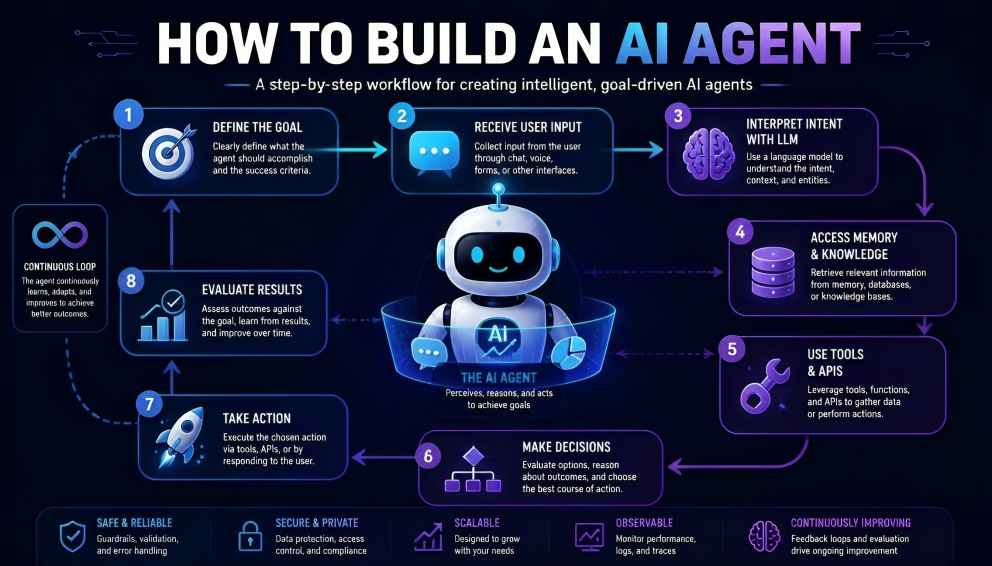
How to build an AI Agent: Step-by-Step Process
Follow these practical steps to create a useful agent.
1. Define one narrow, measurable job.
Avoid vague goals such as “help with customer service”. Go for something specific like, “Respond to product questions using the help centre and pass on billing issues to a person after three messages.” Set clear success markers and gather 20-50 real examples of the task, including the tough ones.
2. Choose your model and access method.
For many initial projects, using hosted frontier models like those from Anthropic, OpenAI, and Google will give you the best reasoning and tool capabilities. If you need to cut costs and ensure data privacy, consider open-weight models once you’re familiar with the workload.
3. Select a build path.
- No-code or low-code platforms for quick internal tools.
- Lightweight frameworks or SDKs (OpenAI Agents SDK, Pydantic AI, CrewAI) for fast prototypes.
- LangGraph or Microsoft Agent Framework when you need explicit control over state, branching, and long-running processes.
- A pure Python loop with function calling if you want maximum transparency and minimal dependencies.
4. Design a small set of tools
Start by giving the agent just a few tools it really needs, maybe two to four. Check each tool’s input with care. Use typed schemas to stop the model from creating wrong arguments. Keep code or file actions in a sandbox.
5. Write clear instructions.
Explain to the agent what it needs to do, how success is measured, and any actions it should avoid. Let it know when it should seek assistance and how to format its outputs. Make sure the prompt is clear and try it out with your examples.
6. Add memory, state, and the control loop.
Figure out what the agent needs to keep in mind both during a session and for future sessions. Put caps on steps, tokens, and tool calls, so the agent doesn’t keep going endlessly.
7. Build evaluation and guardrails early.
Set up an evaluation set before fine-tuning the agent. Check for accuracy, safety, expense, and delay. Include human approval for actions that can’t be undone or are important. Record every decision for future reference.
8. Deploy, monitor, and improve
Start with a limited pilot. Keep an eye on how well it works, how much each task costs, what goes wrong, and what users think. Tweak the tools, instructions, and models as needed. Once the agent is off the laptop, use tracking tools like tracing and cost dashboards to see what’s happening.
Popular Frameworks in 2026
- LangGraph – Excellent for complex, stateful, production workflows with checkpoints and human approval.
- CrewAI – Fastest path to role-based multi-agent teams.
- OpenAI Agents SDK and Anthropic tooling – clean, lightweight options when you stay close to those model providers.
- Pydantic AI – Strong typing and structured outputs for Python developers.
- Microsoft Agent Framework – Solid choice inside the Microsoft/Azure ecosystem.
- Google ADK – Natural fit for Gemini and Google Cloud users.
For a basic agent, you don’t need a framework. A lot of teams start with a simple loop and only add more structure as the project expands.
Best Practices and Current Trends
- Keep the first version extremely narrow. Expand only after it works reliably.
- Prefer tools with strong validation over open-ended capabilities.
- Treat evaluation as a first-class part of the project, not an afterthought.
- Use emerging standards such as Model Context Protocol (MCP) for tool connections and Agent-to-Agent (A2A) protocols when multiple agents need to collaborate.
- Monitor cost carefully. Reasoning models and multi-step loops can become expensive without limits.
- Always plan for human oversight on high-impact decisions.
- Document the agent’s purpose, allowed tools, and known limitations for future maintainers.
Common Challenges and How to Handle Them
Agents might repeat actions, make mistakes with tool commands, or do things they’re not supposed to. Setting clear rules, limiting steps, checking what goes in, using safe environments, and getting human checks help fix these issues. Production agents should have the right identity, keep logs, and be able to stop or pause a process if it goes out of control.
Final Recommendation
To build an AI agent that really works well. Focus on a simple task, use a good model, include a few effective tools, and have a strong evaluation set ready.
When you get that first agent running smoothly, you can either add more functions or bring in expert teammates. Successful teams see agent building as precise work, not just guesswork. Begin with small steps, test everything carefully, and let people make the key decisions. This way, AI agents go from being cool demos to systems you can rely on.