
To make a professional-looking video, you needed access to expensive software, cameras, and editing know-how. By 2026, that barrier has become almost non-existent. You will interact directly with an AI video generator free online, which anyone can try by giving simple prompts in text form, an image, or scripts, and render well-made clips in a web browser within minutes. Whoever you are – be it a content creator, marketer, small business owner, or just experimenting – these tools will allow you to make high-quality videos with much less cost compared to traditional methods.
What is an AI Video Generator Free Online?
An AI video generator free online is a tool that we can access through the internet, providing us with advanced artificial intelligence models capable of creating short videos using text descriptions (text-to-video) or still images (image-to-video), even from an existing clip. Modern systems are aware of camera movement or lighting, physics if needed, and even audio or lip-sync in some cases.
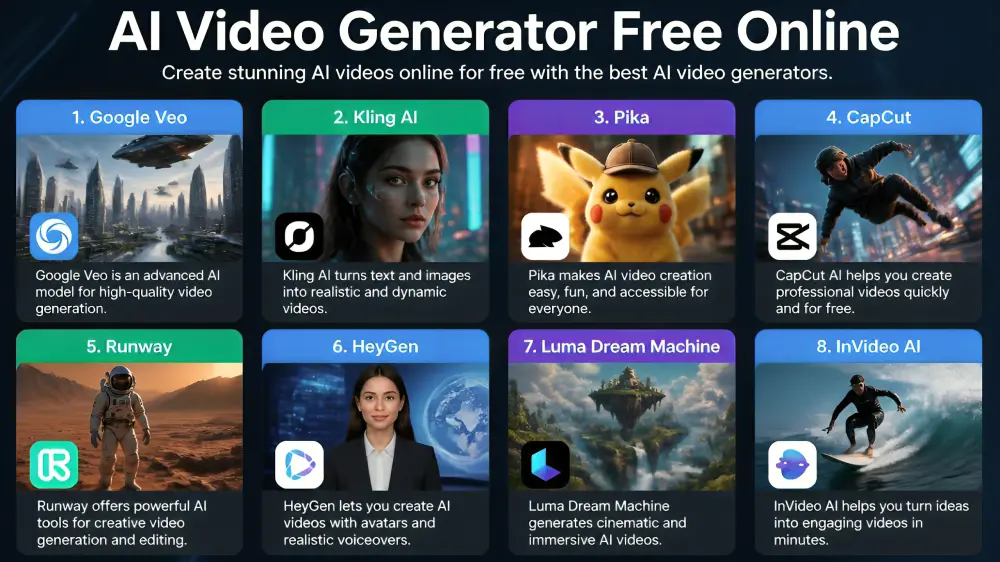
Some of the most popular free or freemium alternatives in 2026 are going to be Google Veo (via Gemini or AI Studio), Kling AI, Pika, Runway, CapCut, Luma Dream Machine, HeyGen, etc. Many work right in your browser – no install required – and give you daily or monthly credits for free so you can start experimenting right away.
Why use a free online AI video generator?
The advantages are clear and practical:
- Zero or low cost to start—Generate clips without paying anything upfront.
- Speed — Turn an idea into a short video in under a minute in many cases.
- Accessibility — No need for advanced editing software or technical expertise.
- Creativity boost — Test concepts, social media hooks, product demos, or storyboards quickly.
- Versatility — Suitable for marketing, education, social content, faceless YouTube videos, or personal projects.
Businesses and creators report that free tiers are the best way of prototyping an idea before choosing paid plans.
Top AI Video Generator Free Online in 2026
Here are some of the strongest free options based on current capabilities:
Google Veo (via Gemini / AI Studio)
Known for its cinematic quality and realistic action. Free access comes with some rate-limiting (in practice only a few generations per day), very good prompt adherence, and gradually better audio support. Excellent for high-quality concept tests.
Kling AI
Smooth human motion & longer clips than many free tools. Free credits every day help for multiple tests, but free exports often come with a watermark.
Pika
User-friendly with text-to-video, image-to-video, and fun effects. Its free plan often provides credit renewal monthly and watermark-free installation (in some plans) – good for social media clips.
CapCut
It is less a generator and more an AI-powered editor, yet its free desktop version is super effective. Great auto-captions, templates, and background removal without a watermark on standard exports. Great for always finishing off an AI-generated clip or publishing a social media post.
Runway
Offers creative controls (camera moves and motion tools) limited to a free credit package, a one-time level in currency. Best for people who want to have more control over their results.
Other notable mentions
HeyGen (avatar-based talking-head videos — not too many free minutes), Luma Dream Machine (very good image-to-video from a photo source), and InVideo AI (prompt-to-full faceless videos with some weekly free mins). Availability and exact limits change often, so check the current free tier on each platform.
How to get the most out of Free AI Video Tools
- Start with clear prompts — describe the scene, camera angle, style, lighting, and mood in detail.
- Combine tools — generate raw clips with one model, then polish them in CapCut or Canva.
- Work within limits — Most free tiers restrict clip length (often 4–10 seconds) or resolution (720p is common) or add watermarks. Plan short, focused shots.
- Iterate — Generate multiple versions and select the best.
- Respect usage rights — review each platform’s terms for commercial use of free outputs.
Limitations to Keep in Mind
Free tiers are designed/created for trial and light usage. These include daily or monthly generation limits, relatively short video duration limits, low resolution, watermarking, and queues during peak hours. The body of work, usually stitched together from several shots, often isn’t consistent in terms of character appearance, and audio features are either missing or available only under a paid plan. An upgrade is commonly required with high-volume or fully polished commercial work.
The future of Free Online AI Video Generation
The ever-evolving osmosis of AI video technology. By the time we reach 2026, better physics, coherent longer clips, native audio, and firm character consistency will be available even at the free tier. Count on this becoming simpler and more integrated with your other creative tools (and quality continuing to improve) as new versions roll out. What seems like experimentation today will be the everyday production infrastructure of tomorrow.
In Summary
With an AI video generator free online, the barrier to entry for video creation has shifted away from being a nuanced skill and into something that almost anyone with an idea and internet connection can access. Exceptional tools like Google Veo, Kling, Pika, and CapCut yield remarkable results for free—ideal for experimentation, prototyping, or short-form production. Although the free plans have limitations, their capabilities are nonetheless considerable.
FAQ’s
Q1. Is there a completely free AI video generator with no watermark?
Ans. Yes, some tools allow you to export video without watermarks on free plans. The most common tool used for this is CapCut (desktop version). You may sometimes get clean exports from Google Veo with no markings apart from a light identifier, and some plans of Pika (or other platforms) allow you to install watermark-free footage. The days of the free tier are changing all the time, so just always check online.
Q2. How long can videos be with a free AI video generator?
Ans. Most free tiers are limited to 4–10 second clips per generation. Some tools give you the option to stitch together multiple short clips or provide a single longer output (up to 15–30 seconds on several free allowances). Longer-end videos might involve a paid plan.
Q3. Can I use videos from a free AI video generator for commercial purposes?
Ans. It varies depending on the terms of the platform. While some free tiers include commercial use (especially CapCut, as well as several of the Google and Pika plans), other tools prevent using outputs in any commercial projects with free usage (only personal or non-commercial).