
Teaching is a job with a heavy workload every day. Developing lessons, finding differentiated materials, providing feedback on student work, developing assessments, and communicating with families can take hours. It’s 2026, and the best AI tools for teachers do most of the heavy lifting while keeping students at the centre of the learning experience. These tools automate repetitive tasks, allowing educators to focus more on teaching, mentoring, and relationship-building.
It defines these tools, discusses how they matter, highlights which have been tried-and-true for common classroom tasks, and outlines effective approaches to using them responsibly. It reflects the options open to educators this year: free programmes from large providers or specialist education platforms.
What are the best AI tools for teachers?
AI tools for teachers are software applications that use artificial intelligence to assist in day-to-day teaching work. They could be asked to create lesson plans, differentiate reading resources, write feedback comments, generate quizzes, convert family messages from one language to another, or help to organise curriculum documents.
In contrast to general-use chatbots, many education-centred tools include curriculum alignment options alongside classroom-ready templates and enhanced privacy protections. Some work as standalone platforms. Some directly integrate with Google Classroom, Microsoft Teams, Docs, or Canvas. The better ones act as assistants rather than teacher-judger replacements.
Key Benefits of Using AI in the Classroom
Teachers who adopt these tools thoughtfully often report real-time savings—sometimes several hours each week. Common benefits include:
- Faster creation of lesson plans, worksheets, and assessments
- Easy differentiation of materials for mixed-ability classes
- Quicker, more consistent feedback on student work
- Better parent communication through translated or polished messages
- Support for research and source-based materials
- Reduced administrative load so more energy goes into instruction
Using AI well also enables the generation of broader and more inclusive resources, so teachers are freed from focusing on tedious work to focus instead on higher-value activities such as facilitating discussion or supporting individual students.
Popular Categories of Best AI Tools for Teachers
Different tools solve different problems. Here are the main categories educators use in 2026:
Lesson Planning and Content Creation
They are tools that transform a topic, grade level, and standards into plans, slides, or activities.
Differentiation and Accessibility
Tools that rewrite texts at many different reading levels, generate vocabulary supports, creation of scaffolds.
Assessment and Feedback
We have platforms with quiz generation, auto-grading, and personalized comments on rubrics.
General Assistants and Research
Flexible chat tools for brainstorming, drafting emails, summarising sources, or exploring ideas.
Student-Facing Tutors and Learning Spaces
Teacher supervision tools that provide students with guided practice.
Integration and Workflow Tools
To be extensions or built-in tools that run in the software that teachers use every day.
Top AI Tools Teachers Are Using in 2026
Here are some of the most practical and widely adopted options based on real classroom use this year:
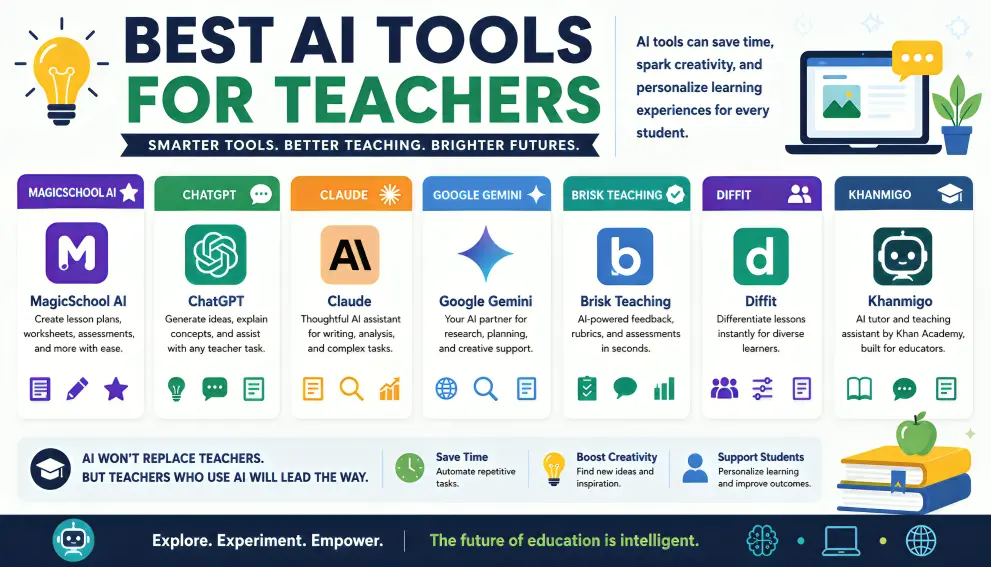
The all-in-one platform has over 80 tools for teachers. It addresses lesson plans, rubrics, IEPs, parent emails, quizzes, and so on. So many teachers get started here because it has a very wide free tier AND is classroom-facing.
ChatGPT for Teachers
OpenAI provides a free education workspace (for U.S. K12 teachers who are verified) through at least mid-2028. In terms of capability, it excels at drafting, research, and content generation in a more secure environment — text data is not used for training by default.
Claude for Teachers:
Free premium access from Anthropic, including standards-aligned features and connections to tools for classroom use (for one year for verified U.S. K12 teachers). The AI also excels at long documents, nuanced feedback, and precise instruction-following.
Google Gemini (for Education)
Integrated into Google Workspace and Google Classroom. Within Docs, Slides, and Classroom, teachers can create quizzes from documents and study materials and differentiate content. Perfect for schools that are already accustomed to using Google tools.
Brisk Teaching
A web browser plug-in/complement that runs within Google Docs, Slides, YouTube, and others. Great for on-the-spot differentiation and feedback; limited to the confines of your workflow engine, it prevents the need to leave your existing work environment.
Diffit
Can reword any text or article in a matter of seconds for different reading levels. Great for inclusive classrooms and ELL students.
Khanmigo
Khan Academy’s AI tutor and teacher aide. Free for many verified teachers and sturdy for supervised pupil observation in alignment with curricular content material.
NotebookLM
Google’s source-grounded tool. You can upload your own documents or curriculum material to generate study guides and quizzes, summaries, and perform audio overviews that remain true to the sources.
Other helpful options include Eduaide.ai for AI term generation for pedagogy-based ones, visual resources for Canva for Education; and a markup workflow with Formative or Gradescope!
How to Choose and Start Using AI Tools Effectively
- Identify your biggest time drain. Is it planning, differentiation, feedback, or communication? Match the tool to that need first.
- Start with free or school-provided options. Many major providers have switched to providing free educator access. Avoid using tools not already supported at your school for improved data protection
- Never enter identifiable student information. Keep personal data out of prompts. Use anonymised examples when needed.
- Review and adapt every output. AI generates drafts. You remain the professional who checks accuracy, aligns with standards, and adds the human touch.
- Build simple workflows. For example, generate a draft lesson in MagicSchool, differentiate the reading with Diffit, and then refine feedback comments with Claude or ChatGPT.
- Share and learn with colleagues. Many schools now run informal AI sharing sessions so teachers can swap effective prompts and practices.
Latest Trends in AI for Education (2026)
Free educator access has been expanded by major companies. INTEGRATION (Into Existing Platforms Like Google Classroom & Microsoft Copilot): Curriculum alignment and multilevel differentiation – tools are getting better. Increased attention is also given to teacher control, student safety features, and AI literacy for both educators and students. AI is now thought of as a regular productivity support instead of an experimental add-on for many schools.
Challenges and Responsible Use
AI can often generate factually incorrect or overly generic content, and verifying the facts is critical. Even privacy and data security become such a hot topic – when you can use school-approved tools. If teachers do not rigorously review outputs, overreliance may lead to a diminishment in creativity. These issues are addressed with clear school policies and more professional discretion.
Final Recommendation
The best AI tools for teachers are most effective when they augment rather than replace human expertise. Start with one or two free tools that align with your most everyday needs—MagicSchool or a school-based option (like Gemini for many educators); ChatGPT for Teachers or Claude for Teachers for flexible drafting; and Diffit to aid in differentiation. That is, combining them with great reviews & student relationships.
The aim is straightforward: to take back time for the best parts of teaching. For example, deploying these tools mindfully can allow educators to deliver more effective learning experiences for each learner while working far more efficiently. Go small, control the process, and offload the mundane to tech so you can focus on impact.